Section outline
-
-
This course is a tutorial on the differents functionnalities of Seaborn. A Jupyter Notebook will be available which you should be able to use on GoogleCollab, however if you want to run it locally you will need a python environment and the necessary utilies to read a Jupyter Notebook. The whole course can be done on the Moodle page but slides containing the information of the course is avaible in the Resources section.
-
-
-
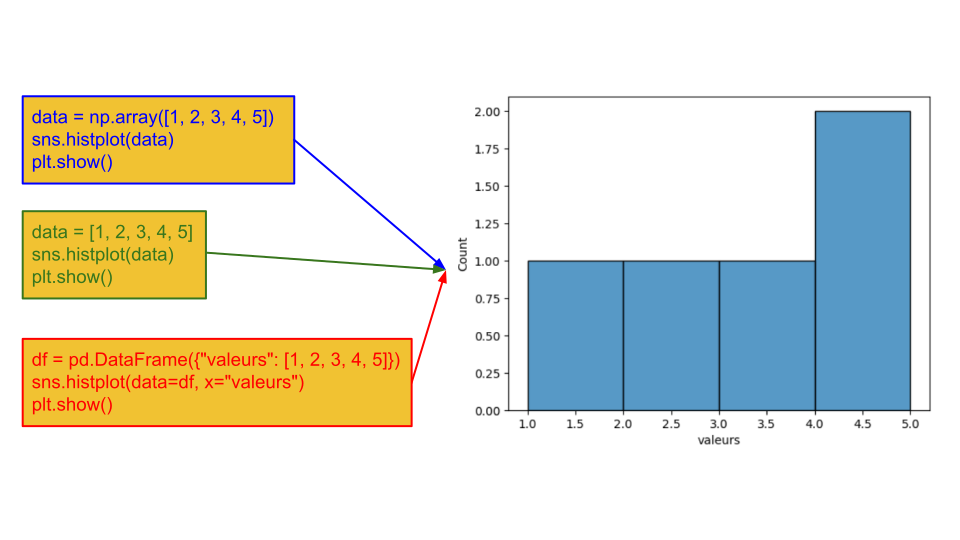
Seaborn can be used with different types of data, whether Python lists, NumPy arrays, or pandas DataFrames, although pandas DataFrames are generally preferred.
Wide-format :
Var1 Val1 Val2 Val3 Var2 Val1 Var3Val11 Var3Val12 Var3Val13 Val2 Var3Val21 Var3Val22 Var3Val23 Val3 Var3Val31 Var3Val32 Var3Val33 Long-format :
Var1 Var2 Var3 Observation1 Var1Val1 Var2Val1 Var3Val1 Observation2 Var1Val2 Var2Val2 Var3Val2 Observation3 Var1Val3 Var2Val3 Var3Val3 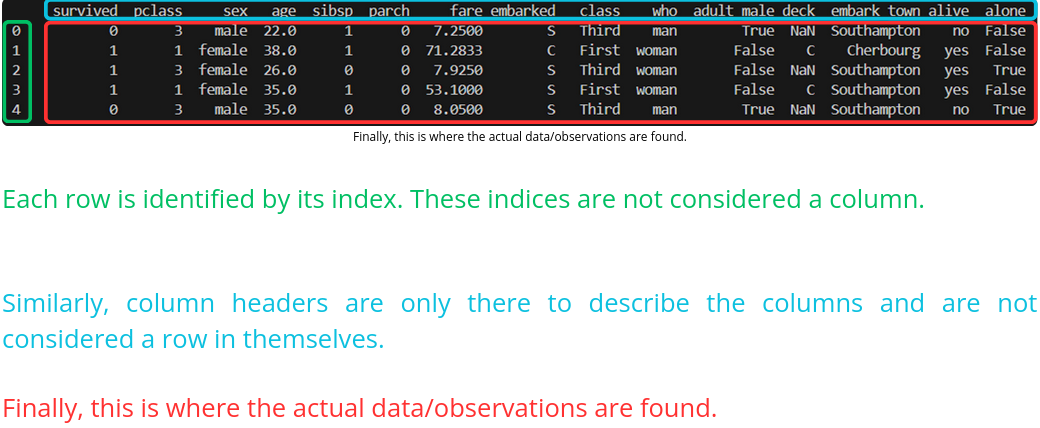
It can be useful to check whether any data is missing:
data=sns.load_dataset("penguins") print(data.isnull())#sur le tableau entier print(data.isnull().any())#sur chaque colonnedata.dropna(subset=["body_mass_g"])
-
-
-
-
-
The relplot() function allows you to create scatter plots and line plots.
Here is the function signature:
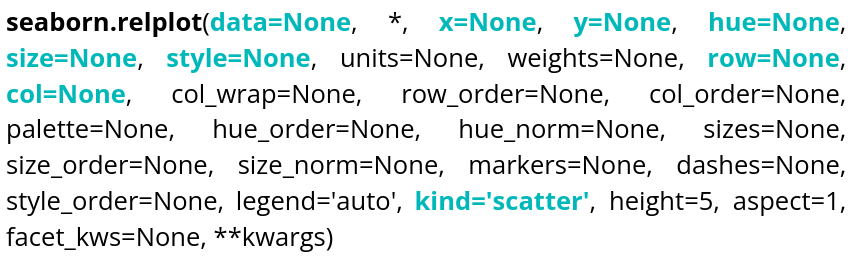
There is of course documentation available online, so we will only go over the most essential elements in order to display what we need as quickly as possible, namely:
Parameter name Description Format Example data The dataframe you are working on
DataFrame, Series, dict, array, or list of arrays data=table x Variable for the x-axis String corresponding to a variable x="weight" y Variable for the y-axis String corresponding to a variable y=”height” hue Allows to add a variable as different colors String corresponding to a variable hue=”age” size Allows to add a variable as the size of points String corresponding to a variable size=”money” style Allows to add a variable as the type of points String corresponding to a variable style=”sex” row Allows to create a table of plots, controling the number of rows String corresponding to a variable row=”category” col Allows to create a table of plots, controling the number of columns String corresponding to a variable col=”job” kind Type of plot you want String corresponding to a type kind=”scatter” or kind=”line” data = sns.load_dataset("penguins") sns.relplot(data=data,x="bill_length_mm",y="bill_depth_mm",hue="species",style="sex",size="body_mass_g",col="island") plt.show()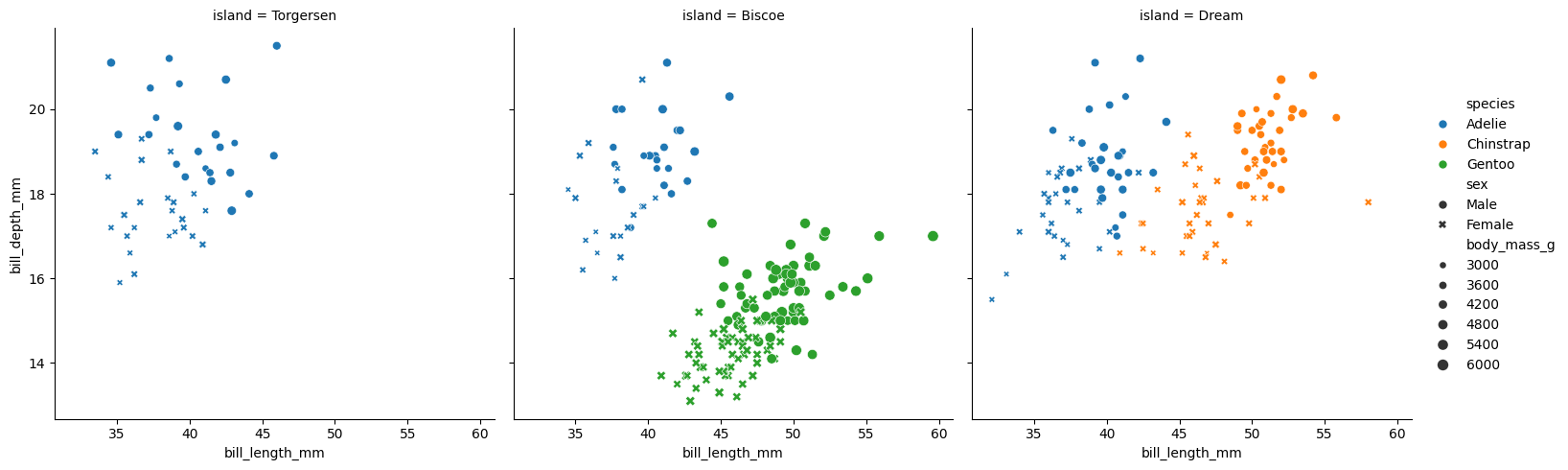
We can see that col allows us to create different plots within the same figure.
We can also add ellipses to relplot() scatter plots; to draw on them, we need to retrieve the axis (ax):
df = sns.load_dataset("penguins")
df = df[["species", "bill_length_mm", "body_mass_g"]].dropna()

g = sns.relplot(
    data=df,
    x="bill_length_mm",
    y="body_mass_g",
    hue="species",
    kind="scatter",
    height=5
)
ax = g.ax

def add_confidence_ellipse(x, y, ax, n_std=2.0, **kwargs):
    cov = np.cov(x, y)
    mean = np.mean(x), np.mean(y)
    eigvals, eigvecs = np.linalg.eigh(cov)
    order = eigvals.argsort()[::-1]
    eigvals, eigvecs = eigvals[order], eigvecs[:, order]
    angle = np.degrees(np.arctan2(*eigvecs[:, 0][::-1]))
    width, height = 2 * n_std * np.sqrt(eigvals)
    ellipse = Ellipse(
        xy=mean,
        width=width,
        height=height,
        angle=angle,
        fill=False,
        **kwargs
    )
    ax.add_patch(ellipse)

palette = sns.color_palette()

for i, species in enumerate(df["species"].unique()):
    subset = df[df["species"] == species]
    add_confidence_ellipse(
        subset["bill_length_mm"],
        subset["body_mass_g"],
        ax,
        edgecolor=palette[i],
        linewidth=2
    )

ax.set_xlabel("Bill length (mm)")
ax.set_ylabel("Body mass (g)")
ax.set_title("95% Confidence Ellipse by Species — Penguins")

plt.show()
Ellipse comes from matplotlib.patches.
And here is the result of this code:
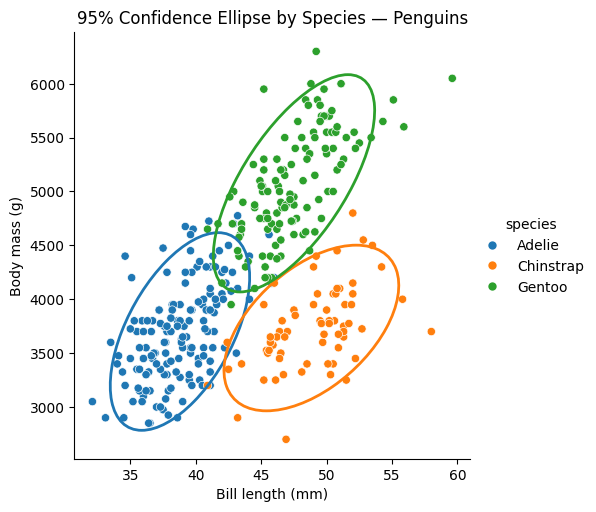
We can also display lines by changing the kind:
df = sns.load_dataset("penguins")
sns.relplot(data=df,x="bill_length_mm",y="bill_depth_mm",hue="species",style="sex",col="island",kind="line")
plt.show()
size cannot be used with line plots; here is the result of the code:
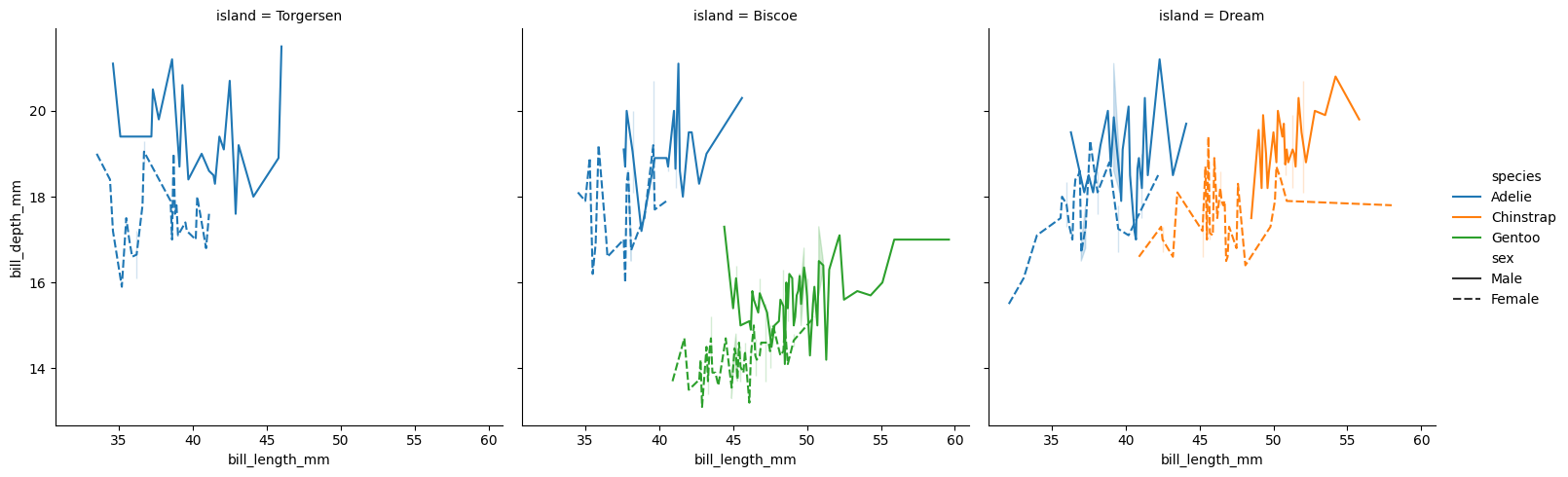
-
-
-
-
-
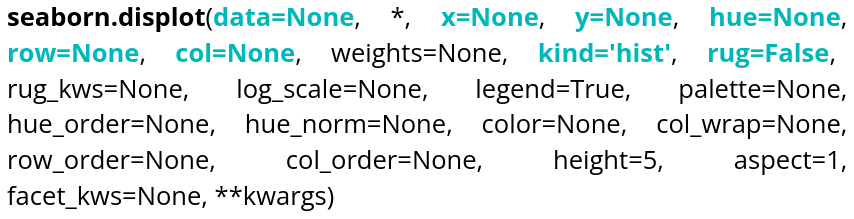
The displot() function allows you to display different types of distributions.
Parameter name Description Format Example data The dataframe you are working on
DataFrame, Series, dict, array, or list of arrays data=table x Variable for the x-axis String corresponding to a variable x="weight" y Variable for the y-axis String corresponding to a variable y=”height” hue Allows to add a variable as different colors String corresponding to a variable hue=”age” row Allows to create a table of plots, controling the number of rows String corresponding to a variable row=”category” col Allows to create a table of plots, controling the number of columns String corresponding to a variable col=”job” kind Type of plot you want String corresponding to a type kind=”hist”,kind=”kde” ou kind=”ecdf” rug Allows to see individual data points on the axes Boolean rug=True Here is an example code that creates a histogram:data = sns.load_dataset("penguins") sns.displot(data=data, x="bill_length_mm", rug=True, hue="sex", bins=20) plt.show()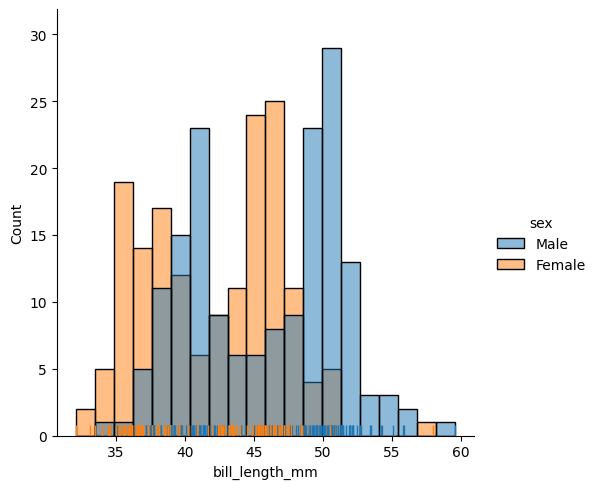
If you don’t specify the data for the y-axis, it will represent the number of occurrences, and if you don’t specify the kind, it defaults to a histogram. The bins argument controls the number of bars.
We also have access to kernel density estimation (KDE) to estimate a distribution. Here is an example of how to use it:
data = sns.load_dataset("penguins")
sns.displot(data=data,x="bill_length_mm", rug=True, hue="sex", kind="kde")
plt.show()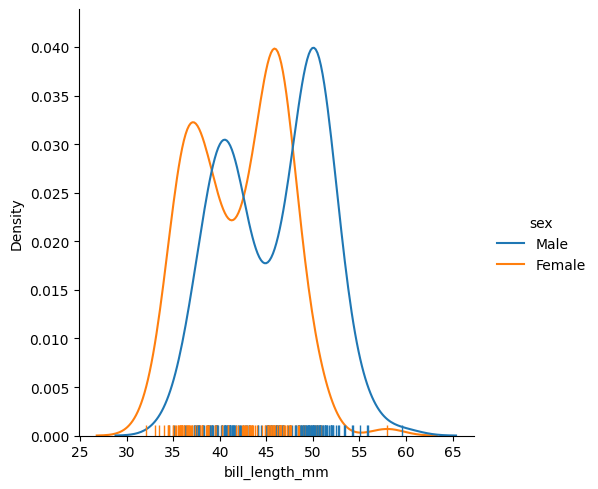
If you specify a variable for the y-axis:
data = sns.load_dataset("penguins")
sns.displot(data=data,x="bill_length_mm", y="bill_depth_mm", rug=True, hue="sex", kind="kde")
plt.show()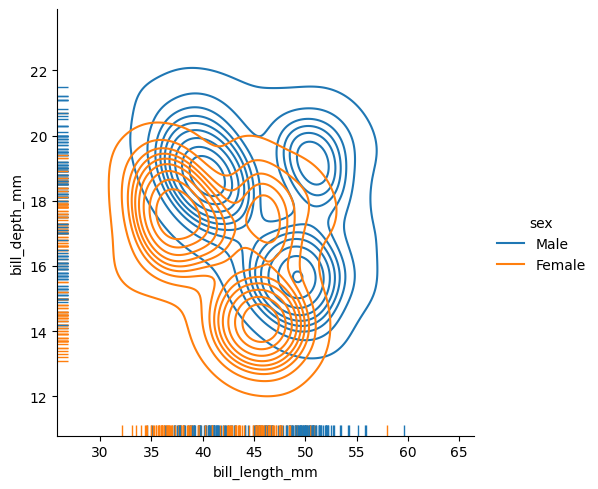
The rug parameter allows you to display individual observations along the axes of the plot.
The last type of distribution available is the ECDF (empirical cumulative distribution function). You cannot specify a y variable for this distribution since it is univariate.
data = sns.load_dataset("penguins") sns.displot(data=data, x="body_mass_g", rug=True, hue="sex", kind="ecdf", row="species", col="sex", height=5) plt.show()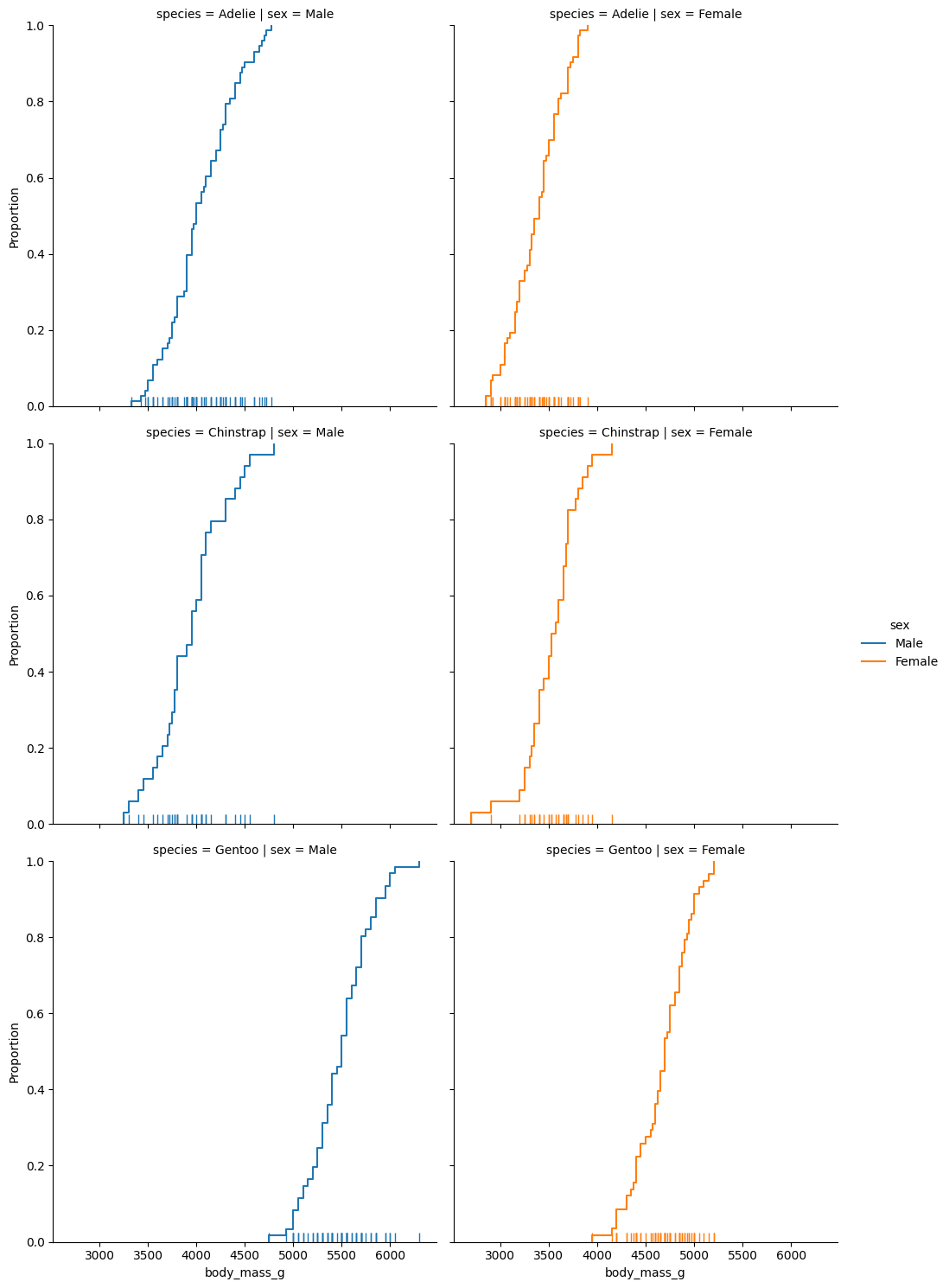 The row parameter allows you to display additional plots based on another variable in the dataset. The height parameter controls the height of the plots.
-
-
-
-
-
Parameter name Description Format Example data The dataframe you are working on
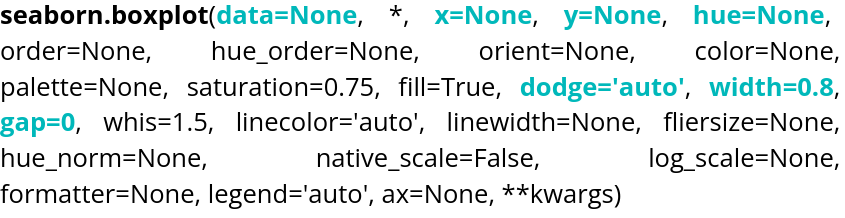
DataFrame, Series, dict, array, or list of arrays data=table x Variable for the x-axis String corresponding to a variable x="weight" y Variable for the y-axis String corresponding to a variable y=”height” hue Allows to add a variable as different colors String corresponding to a variable hue=”age” dodge Variable allowing to choose if the contents of the graphs overlap Boolean dodge=False width Variable controlling the width of the boxes Float width=0.5 gap Variable controlling the gap between different boxes Float gap=0.1
Here is an example of code:
data = sns.load_dataset("penguins")
sns.boxplot(data=data, x="bill_length_mm", hue="island", dodge=True, width=0.5)
plt.show()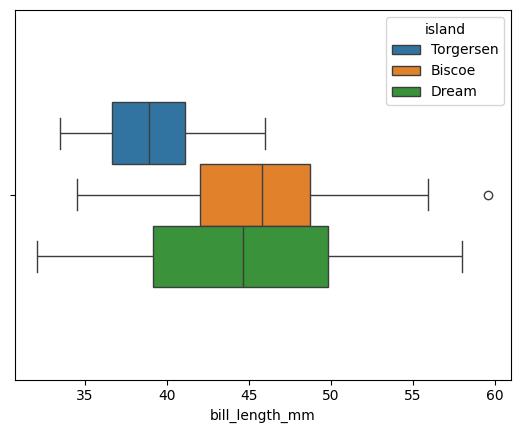
By default, gap is set to 0. The orientation is handled automatically by Seaborn, but if the plot is two-dimensional, it can be chosen manually.data = sns.load_dataset("penguins") sns.boxplot(data=data, x="bill_length_mm", hue="island", dodge=True, width=0.5, gap=0.1, log_scale=True) plt.show()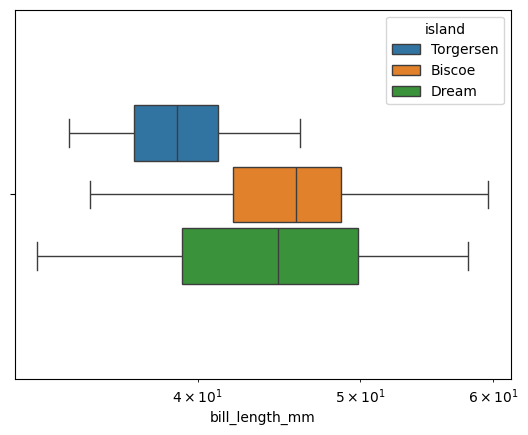
log_scale allows you to change the scale. A numeric value sets the base. If the plot is two-dimensional, two values can be provided, one for each axis.
The violin plot is also accessible via violinplot().
Parameter name Description Format Example data The dataframe you are working on
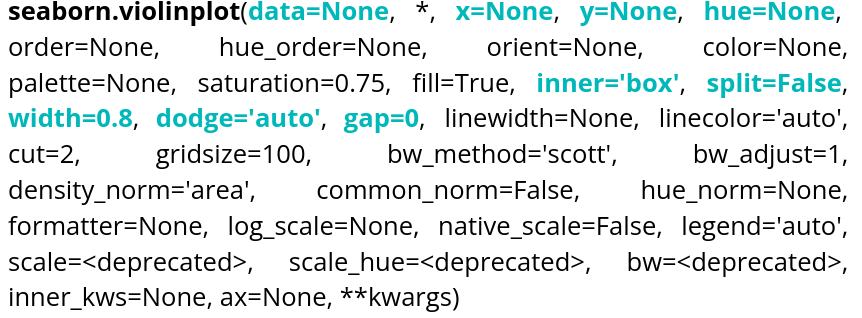
DataFrame, Series, dict, array, or list of arrays data=table x Variable for the x-axis String corresponding to a variable x="weight" y Variable for the y-axis String corresponding to a variable y=”height” hue Allows to add a variable as different colors String corresponding to a variable hue=”age” inner Variable allowing to choose the inner representation of the violin String corresponding to a representation type inner=”box”,inner=”quart”,inner=”point” split Variable allowing to choose to show 2 data groups on the same violin. Boolean split=True width Variable controlling the width of the boxes Float width=0.5 dodge Variable allowing to choose if the contents of the graphs overlap Boolean dodge=False gap Variable controlling the gap between different boxes when dodge is True Float gap=0.1 Here is an example of code:
data = sns.load_dataset("penguins")
sns.violinplot(data=data, x="bill_length_mm", hue="sex", dodge=True, linewidth=3, split=True, inner="point")
plt.show()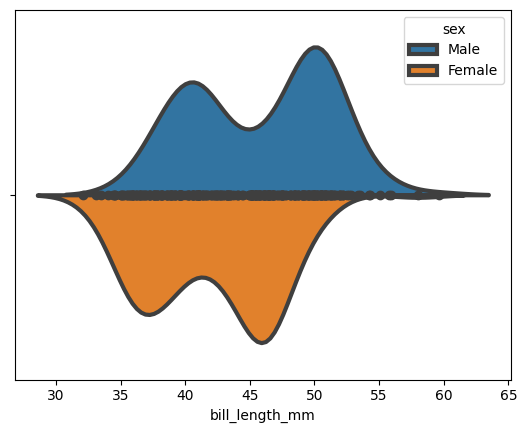
We can choose to display a small box plot within the violin plot:
data = sns.load_dataset("penguins")
sns.violinplot(data=data, x="bill_length_mm", hue="sex",dodge=True,linewidth=3, split=True, inner="box")
plt.show()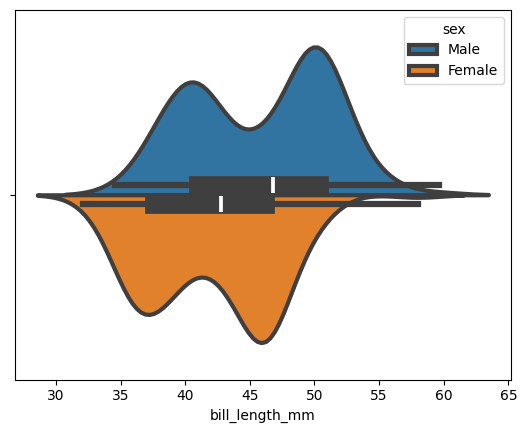
-
-
-
-
-
If you want to perform linear regressions, Seaborn provides a dedicated function: regplot().
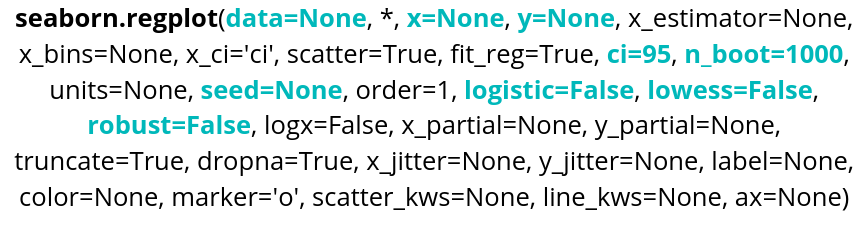
Parameter name Description Format Example data The dataframe you are working on
DataFrame, Series, dict, array, or list of arrays data=table x Variable for the x-axis String corresponding to a variable x="weight" y Variable for the y-axis String corresponding to a variable y=”height” ci Variable allowing to control the confidence interval displayed Integer between 1 and 100 ci=99 nboot Variable indicating the number of bootstrap resampling that will be done Integer nboot=100 seed Variable to indicate a seed for the resampling, allows reproductibility Integer seed=42 logistic Variable allowing to do a logistic regression Boolean logistic=True lowess Variable allowing to do a lowess regression Boolean lowess=True robust Variable allowing to do a robust regression Boolean robust=True regplot() also allows you to display the confidence interval, which is set to 95% by default.
Here is an example of code:
sns.regplot(data=data, x="bill_length_mm",y="bill_depth_mm", ci=70)
plt.show()
We can change the type by selecting a parameter, for example the lowess parameter, and setting it to True: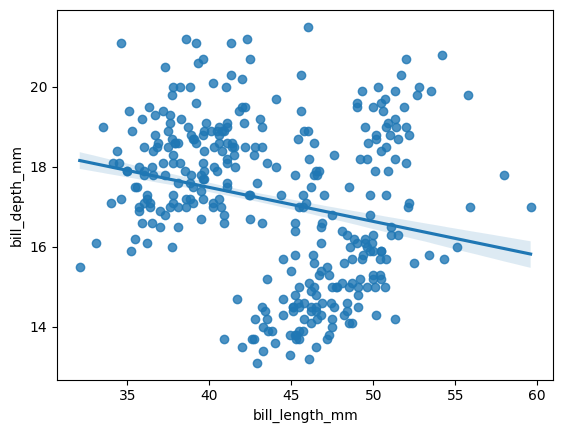
sns.regplot(data=data, x="bill_length_mm", y="bill_depth_mm",
 ci=99, lowess=True)
plt.show()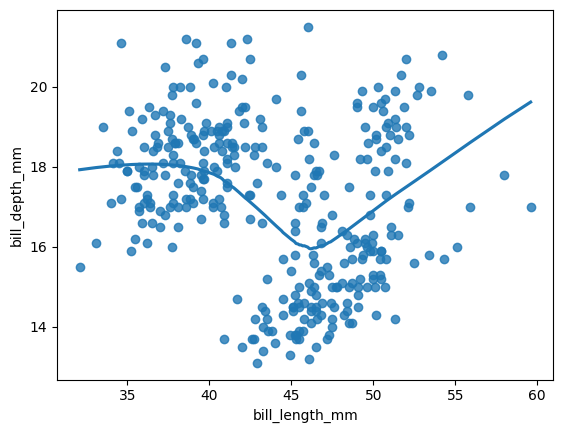
The confidence interval is not displayed when using LOWESS.
Another option is lmplot(), which is more suitable for performing regressions across multiple plots.
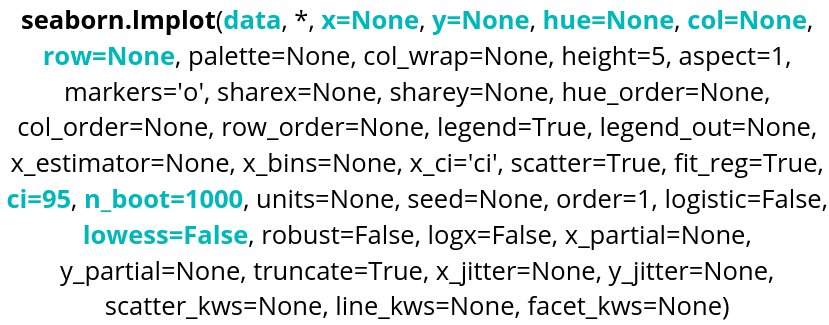
Parameter name Description Format Example data The dataframe you are working on
DataFrame, Series, dict, array, or list of arrays data=table x Variable for the x-axis String corresponding to a variable x="weight" y Variable for the y-axis String corresponding to a variable y=”height” hue Allows to add a variable as different colors String corresponding to a variable hue=”age” row Allows to create a table of plots, controling the number of rows String corresponding to a variable row=”category” col Allows to create a table of plots, controling the number of columns String corresponding to a variable col=”job” ci Variable allowing to control the confidence interval displayed Integer between 1 and 100 ci=99 nboot Variable indicating the number of bootstrap resampling that will be done Integer nboot=100 lowess Variable allowing to do a lowess regression Boolean lowess=True Here is an example of code:
sns.lmplot(data=data, x="bill_length_mm", y="bill_depth_mm", ci=95, hue="island", robust=True, col="sex")
plt.show()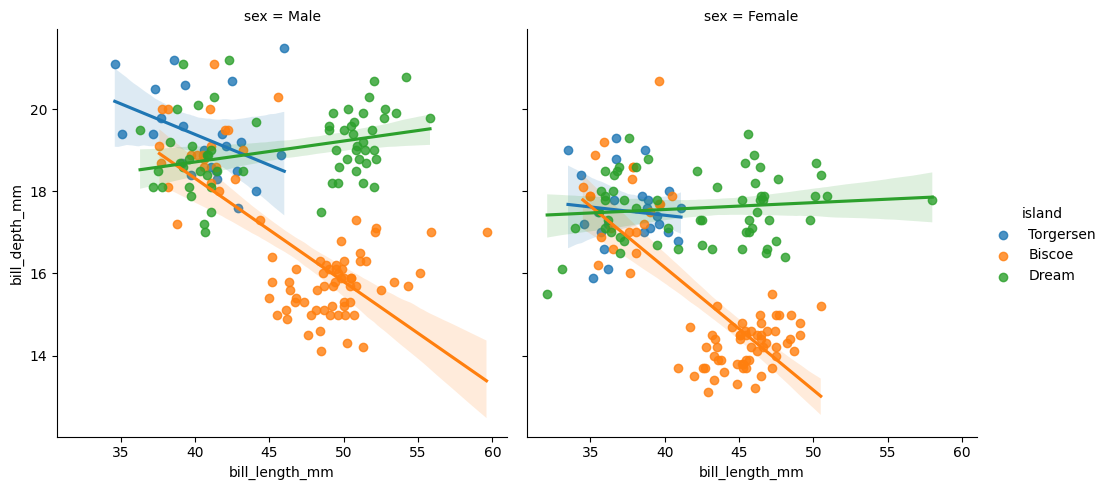
Robust and logistic regressions are also available, as with regplot(). nboot and seed are also available.
-
-
-
-
-
Seaborn also allows you to create heatmaps using heatmap().
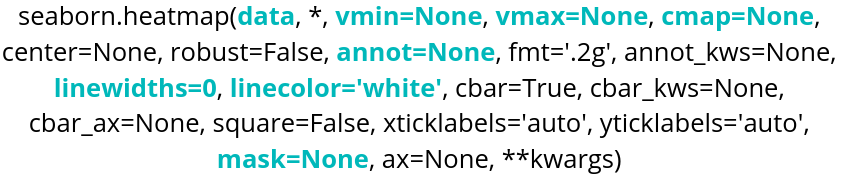
Parameter name Description Format Example data The dataframe you are working on
DataFrame, Series, dict, array, or list of arrays data=table cmap String corresponding to a palette or a Seaborn color_palette cmap=”viridis” or cmap = sns.color_palette("light:blue", as_cmap=True) annot Boolean annot=True, default is False vmin Minimum value that will be taken into account for the colormap. Float vmin=30.6 vmax Maximum value that will be taken into account for the colormap. Float vmax=42 linecolor String corresponding to a color linecolor=”blue” linewidths Float linewidths=0.2 or linewidths=10 mask Parameter used to control the range of values taken into account in the heatmap. Boolean list, same format as data mask=table_mask
Here is an example of code:
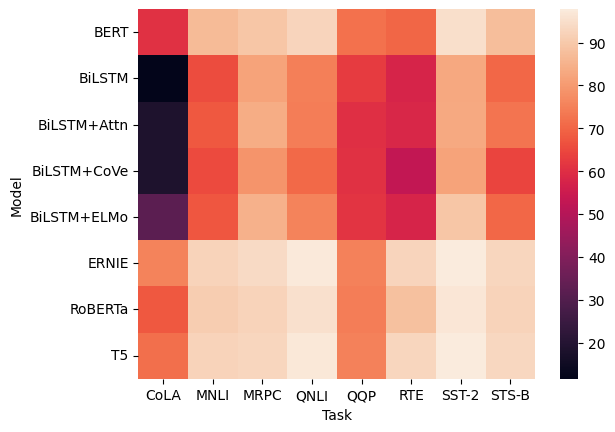
glue=sns.load_dataset("glue").pivot(index="Model",columns="Task",values="Score")
sns.heatmap(glue)
We use pivot to format the data in the order we want:
- index defines the variable for the y-axis (ordinates).
- columns defines the variable for the x-axis (abscissas).
- values must be a numerical variable, and it is what the heatmap will use for coloring.
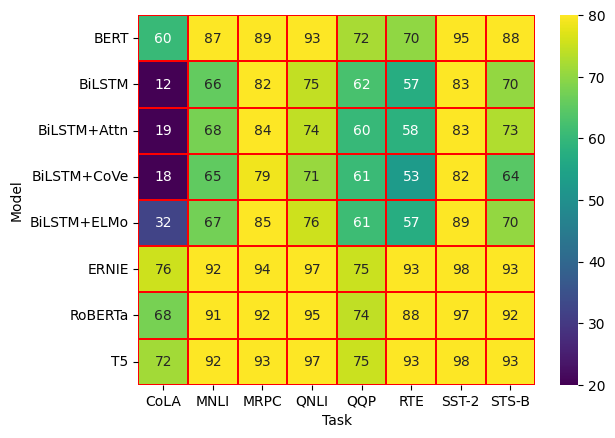
sns.heatmap(glue,cmap="viridis",annot=True,vmin=20,vmax=80,linecolor="red",linewidths=0.1)With the vmin and vmax parameters, we can choose the range of values over which the heatmap will apply, and we also have visual options such as linecolor and linewidths for the lines between the cells.
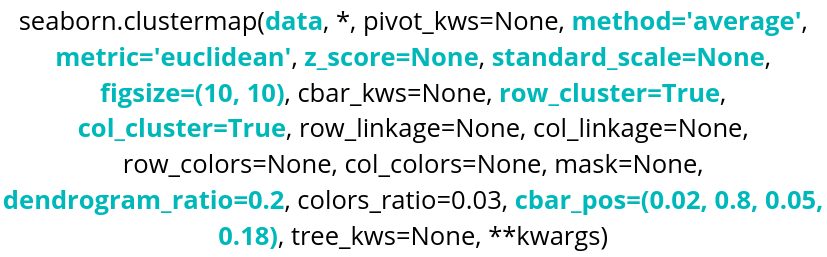
If we need clustering in the heatmap, we can use Seaborn’s clustermap(). One thing to know is that this function requires SciPy, so it must be installed in the environment you are working in. If you are using Colab, this will not be necessary, as you can import it directly.
Parameter name Description Format Example data The dataframe you are working on
DataFrame, Series, dict, array, or list of arrays data=table method SciPy method used to perform clustering. String corresponding to a SciPy method. method=’centroid’ metric SciPy metric used for clustering. String corresponding to a SciPy metric. metric=’jaccard’ z_score Parameter used to center and standardize the data. z_score=0 standard_scale Parameter used to normalize the data, without deviation. standard_scale=1 row_cluster,
col_cluster
Boolean row_cluster=False figsize Parameter controlling the size of the figure. tuple (width, height) figsize=(4,4) dendrogram_ratio tuple (row ratio, column ratio) dendrogram_ratio=(0.2,0.1) cbar_pos tuple (left, bottom, width, height) cbar_pos=(0,0.1,0.05,0.6)
iris = sns.load_dataset("iris")
species = iris.pop("species")
sns.clustermap(iris)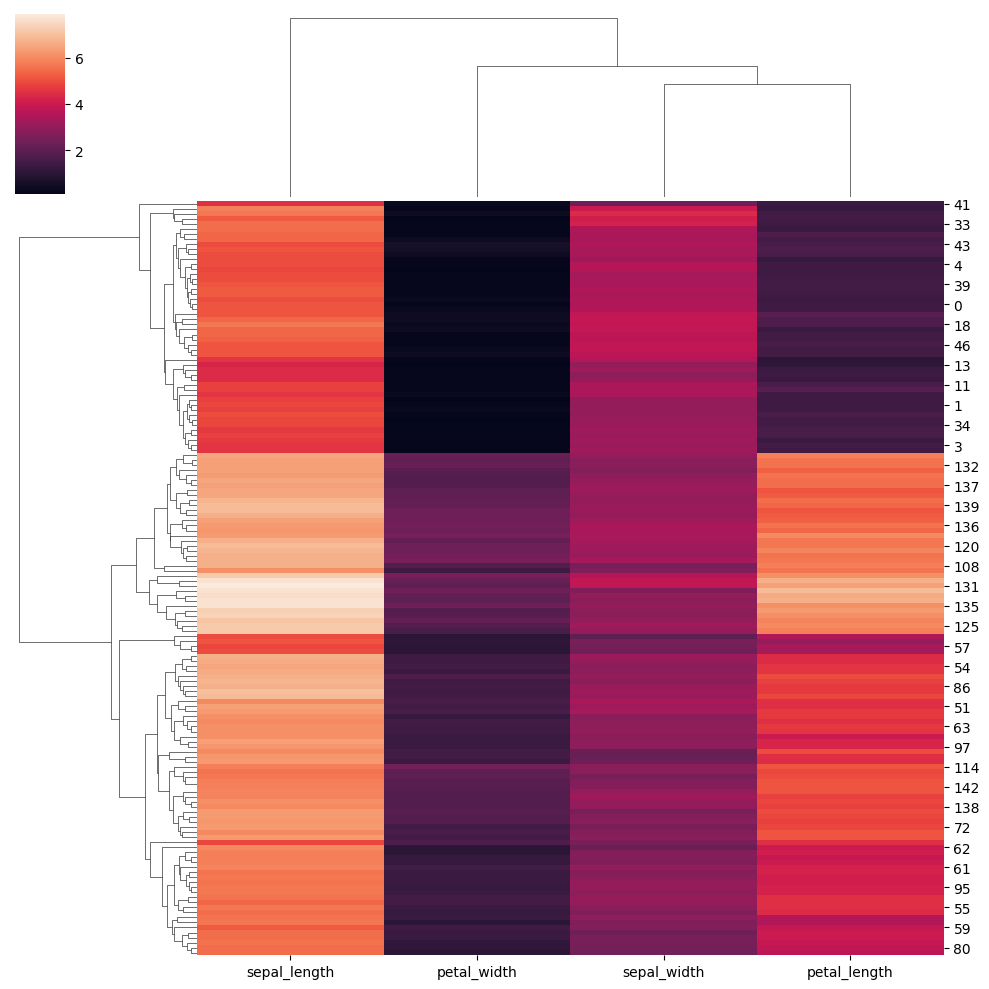
Now let’s explore different parameters:
lut = dict(zip(species.unique(), "rbg"))
row_colors = species.map(lut)
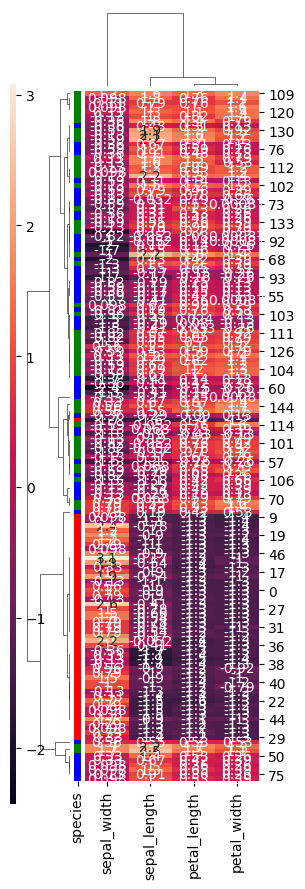
sns.clustermap(iris,row_cluster=True,dendrogram_ratio=(0.2,0.1),row_colors=row_colors,method="weighted",metric="correlation",z_score=1,annot=True,figsize=(3,9),cbar_pos=(0,0.1,0.02,0.8))
row_cluster allows grouping rows based on their similarity in order to reveal clusters. dendrogram_ratio controls the size of the dendrograms: the first value corresponds to the one on the left, and the second to the one at the top. row_colors allows adding a color indicator next to the rows. In this case, using the previous settings, the species of each row is shown. metric defines the similarity (distance) measure used, and method specifies the algorithm used for clustering. Setting z_score to 1 normalizes the data across rows. cbar_pos allows setting the position of the color bar.
-
-
-
-
-
-
The catplot() function allows you to create different types of plots:
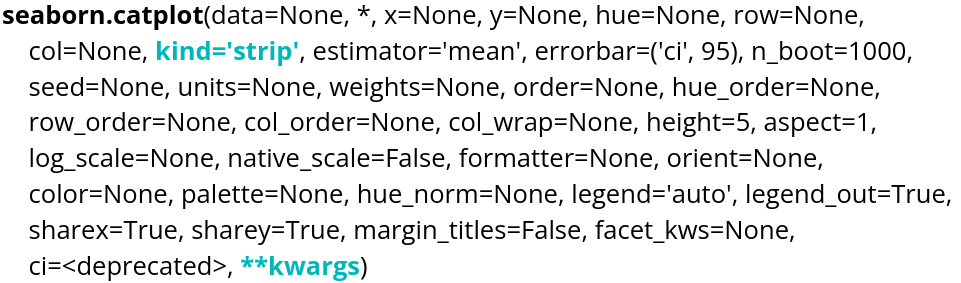
There are different kinds that we will present:
tips=sns.load_dataset("tips")
sns.catplot(tips,x="day", y="total_bill")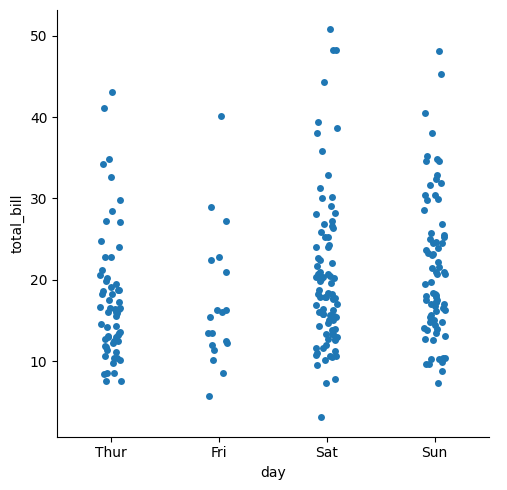
sns.catplot(tips,x="day", y="total_bill",kind="swarm")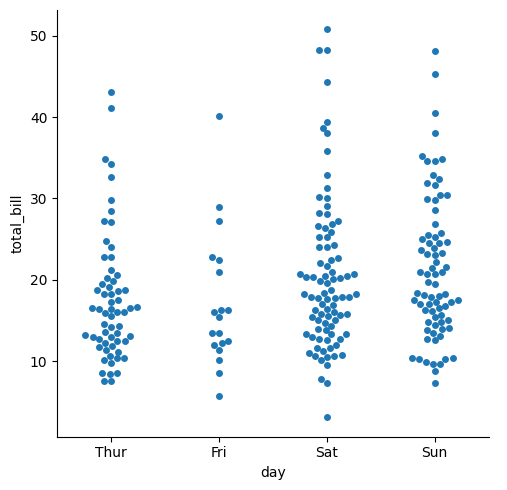
sns.catplot(tips,x="day", y="total_bill",kind="violin")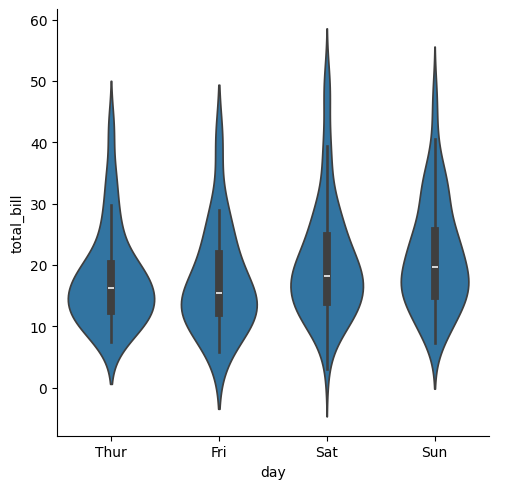
sns.catplot(tips,x="day", y="total_bill",kind="box")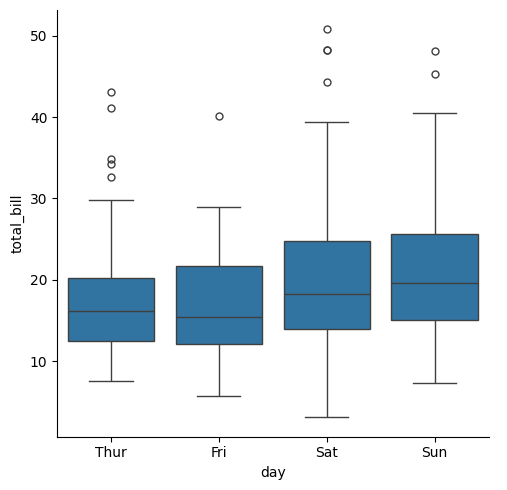
sns.catplot(tips,x="day", y="total_bill",kind="boxen")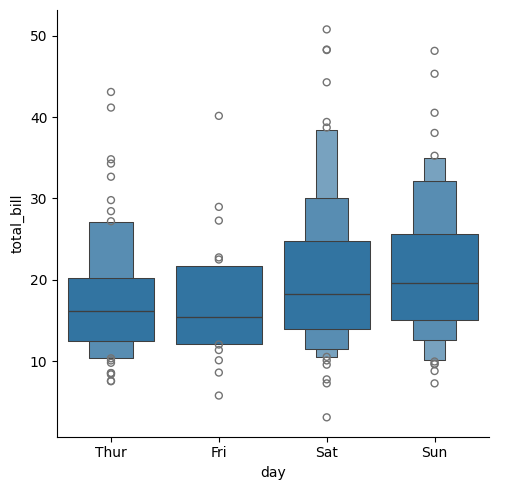
sns.catplot(tips,x="day", y="total_bill",kind="point")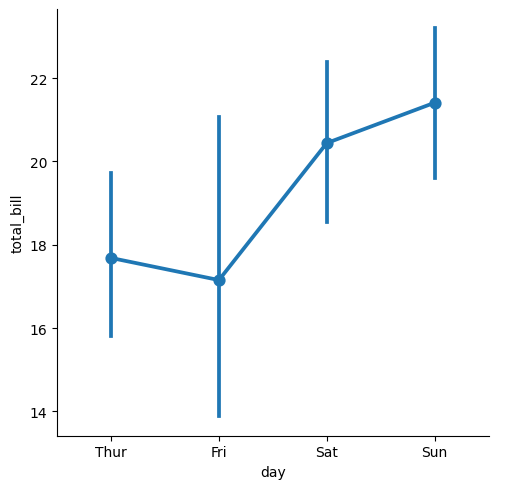
sns.catplot(tips,x="day", y="total_bill",kind="bar")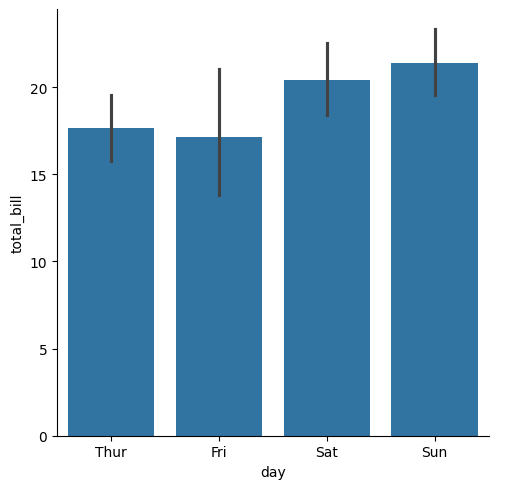
sns.catplot(tips,x="day",kind="count")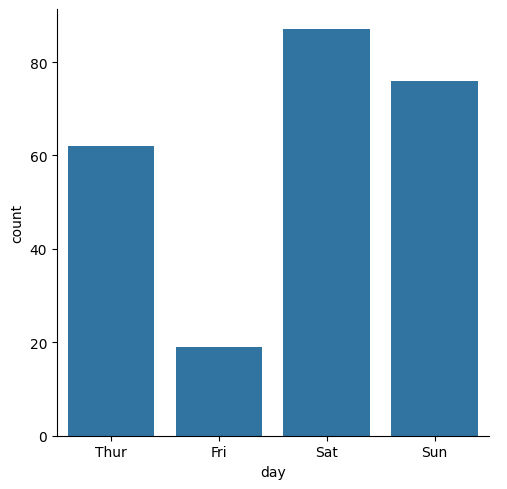
We can use the parameters of the chosen methods. For example, boxplot() has a fill parameter, so it can be specified in the catplot() function.
sns.catplot(kind="box",data=tips,x="smoker",y="total_bill",fill=False)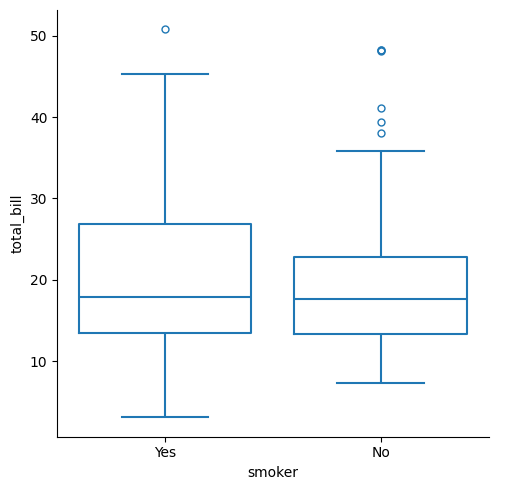
-
-
-
-
Seaborn provides several functions that allow you to plot multiple different graphs at the same time.
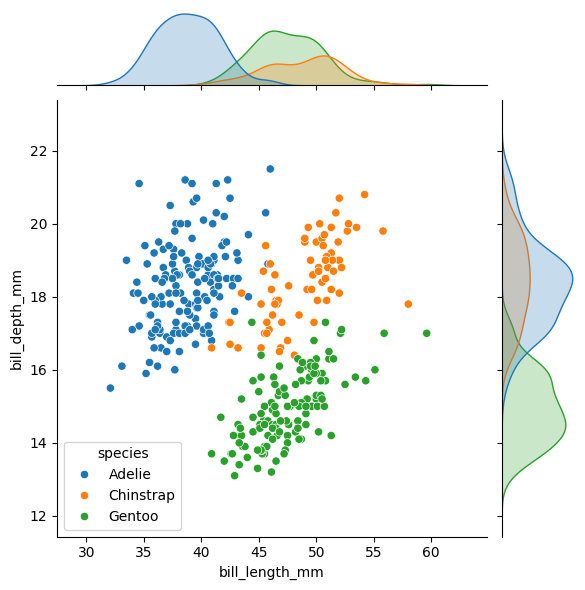
Let’s start with jointplot(). With it, you can display a two-dimensional plot along with the corresponding one-dimensional plots on the axes. Here is an example using the penguins dataset:
g=sns.jointplot(data=data, x="bill_length_mm", y="bill_depth_mm",
 kind="kde", hue="species")

for species in data["species"].unique():
    subset = data[data["species"] == species]
    g.ax_joint.scatter(
        subset["bill_length_mm"],
        subset["bill_depth_mm"],
        s=subset["body_mass_g"]/500,
        label=species,
        alpha=0.7)
The for loop in the code allows the points to be displayed in addition to the plots. It is Matplotlib code.
An alternative that allows for more control and customization is JointGrid(). In particular, you can use different types of plots for the bivariate and univariate parts.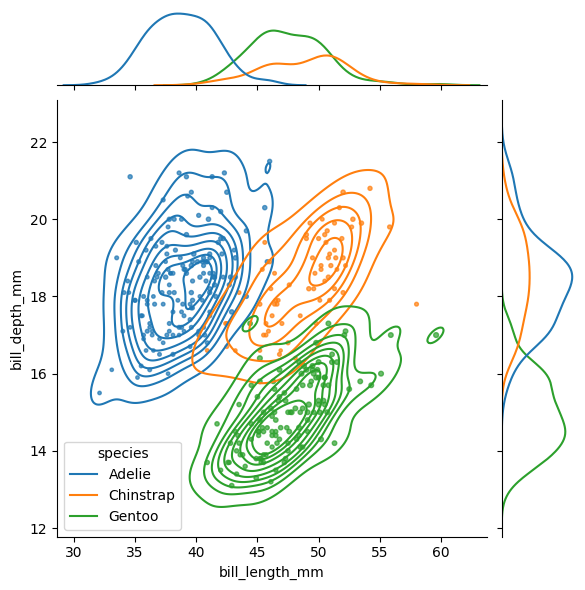
g5 = sns.JointGrid(data=data, x="bill_length_mm", y="bill_depth_mm",
 hue="species")
g5.plot_joint(sns.scatterplot)
g5.plot_marginals(sns.kdeplot, fill=True)
plot_joint() controls the type of the bivariate plot, and plot_marginals() controls the univariate ones.
Another type of visualization is pairplot(). It allows you to display, within a single figure, plots for all pairwise combinations of variables around the diagonal, along with a distribution for each variable on the diagonal.
sns.pairplot(data=data, hue="species")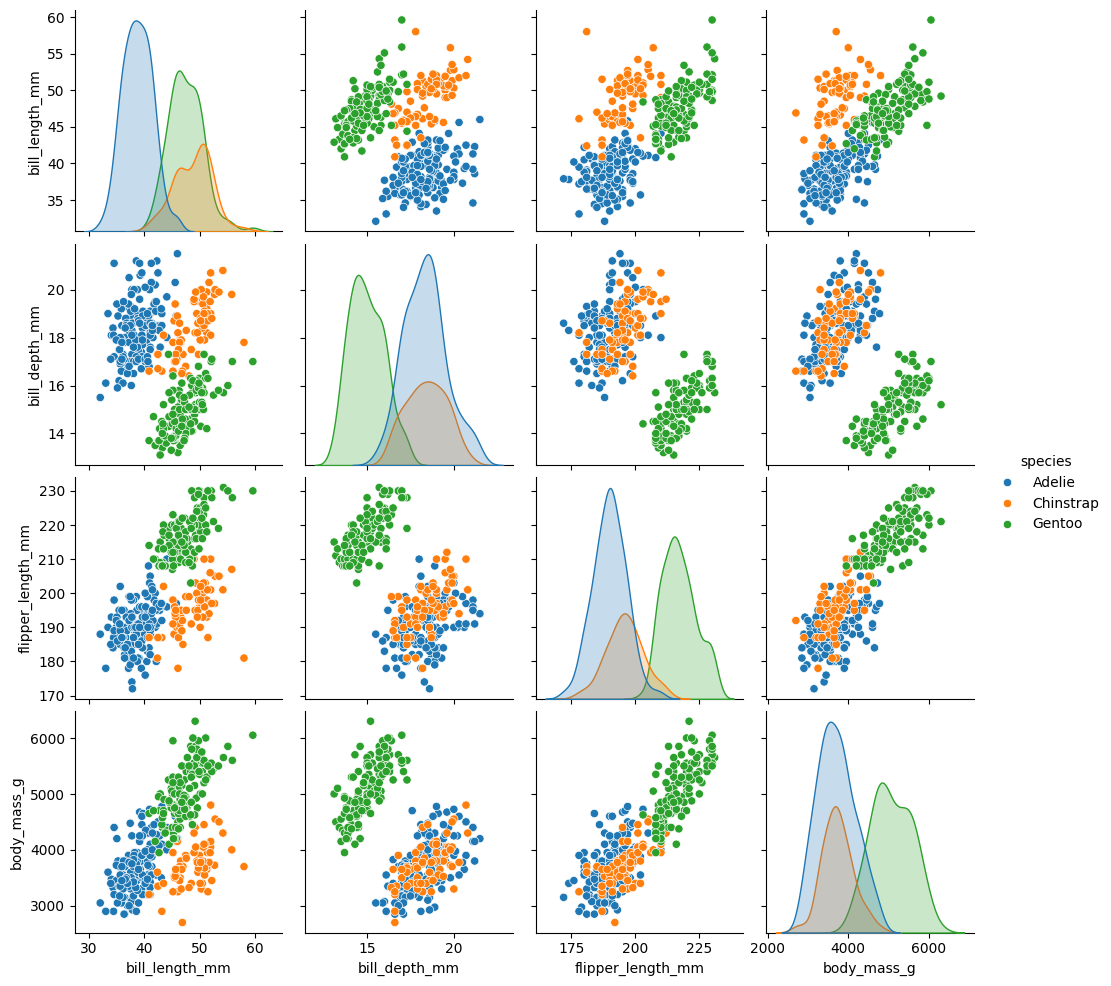
You can modify the type of plot on the diagonal and off-diagonal using diag_kind for the diagonal and kind for the others. diag_kind can only take hist or kde as values.
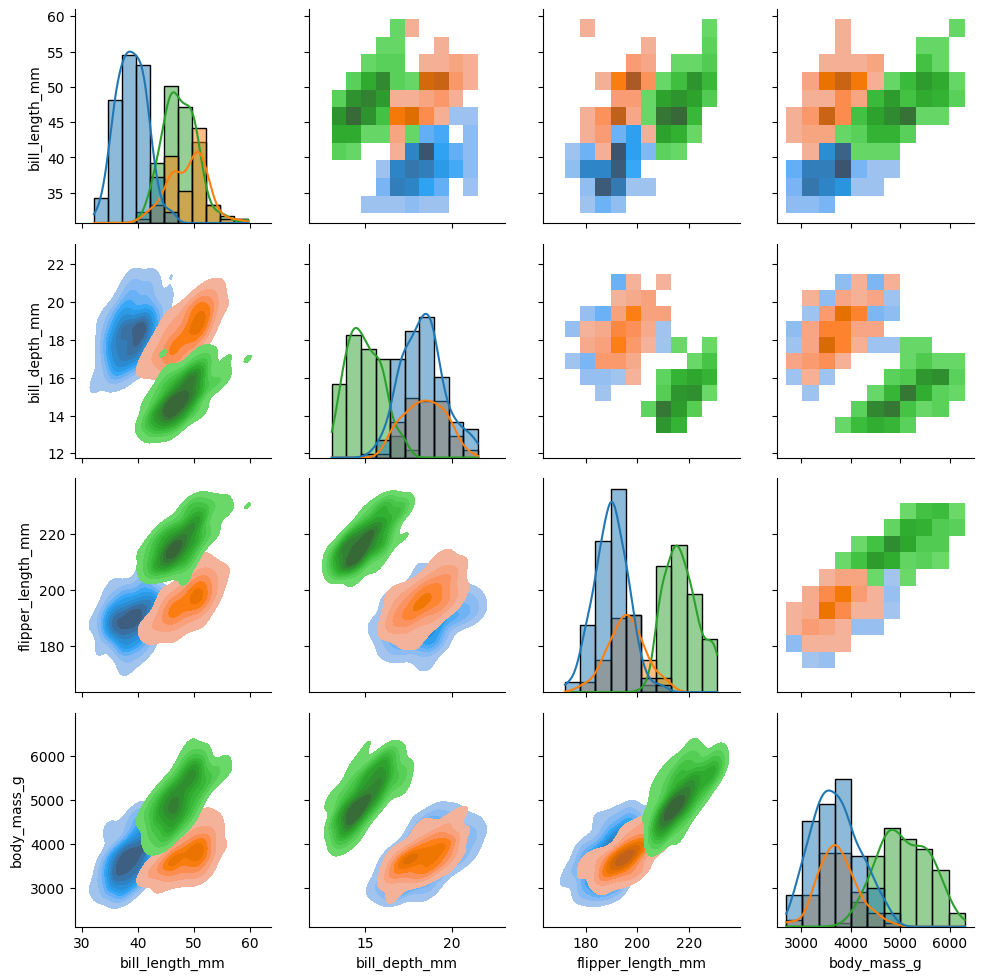
As with jointplot(), pairplot() has a complementary tool that allows for more control and customization: PairGrid(). With it, you can, for example, choose different types of plots above and below the diagonal.
g7 = sns.PairGrid(data, hue="species") g7.map_upper(sns.histplot) g7.map_lower(sns.kdeplot, fill=True) g7.map_diag(sns.histplot, kde=True)map_upper(), map_lower(), and map_diag() allow you to control the different types of plots in the figure.
Finally, we have FacetGrid(), which does not automatically create different plots within a figure but allows you to do so manually using col and row, and to modify plots individually within the figure. It is a function that is closer to Matplotlib:
tips = sns.load_dataset("tips")
g = sns.FacetGrid(tips,col="sex",row="time",margin_titles=True,
     despine=False,sharex=False)
g.figure.subplots_adjust(wspace=0.05, hspace=0.2)
for (row_val, col_val), ax in g.axes_dict.items():
     subset = tips[(tips["time"] == row_val) & (tips["sex"] == col_val)]
     if row_val == "Lunch" and col_val == "Female":
         subset = subset[subset["tip"] > 2]
         sns.scatterplot(data=subset,x="total_bill",y="tip",hue="smoker",
         ax=ax)
         ax.set_facecolor(".3")
         ax.set_xlim(0,20)
         ax.set_ylim(0,30)
         ax.set_xticks([0, 5, 15])
         ax.set_xlabel("tip>2")
         ax.grid(True, color="gray", linestyle="-", linewidth=0.5)
         ax.spines["top"].set_color("red")
         ax.spines["right"].set_color("red")
         ax.spines["bottom"].set_color("red")
         ax.spines["left"].set_color("red")
         ax.tick_params(axis="x", colors="blue")
     else:
         ax.set_facecolor((0, 0, 0, 0))
         sns.scatterplot(data=subset,x="total_bill",y="tip",hue="smoker",
         ax=ax)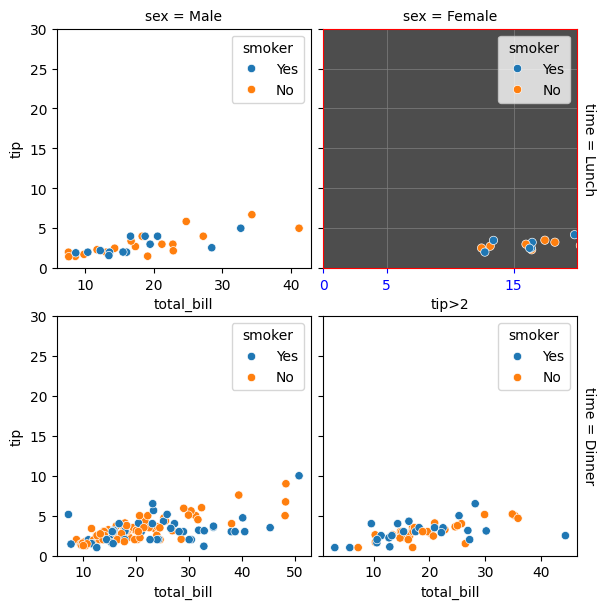
-
-
-
-
-
Since Seaborn version 0.12, Seaborn objects have been introduced. These provide a powerful alternative to the original plotting functions. The objects are inspired by R’s ggplot2.
Let’s take a simple example. First, we import the objects as follows:
import seaborn.objects as soThe way plots are built with objects is specific. A single function is used to create plots:
so.Plot()We then specify the data we are going to use:
so.Plot(tips,x=”total_bill”)Here, tips is Seaborn’s built-in tips dataset.
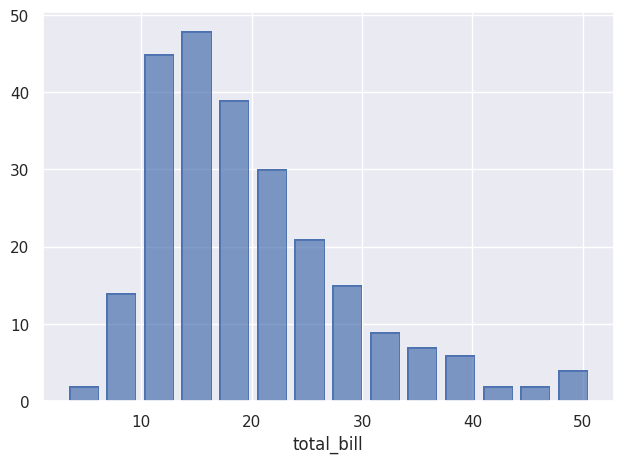
Once the data is specified, we decide what to do with it using add(), here an histogram:
so.Plot(tips,x=”total_bill”).add(so.Bar(),so.Hist()).show()And here is the result:
-
-
-
-
-
The equivalent of scatter plots that can be created with relplot() is the Dot() object.
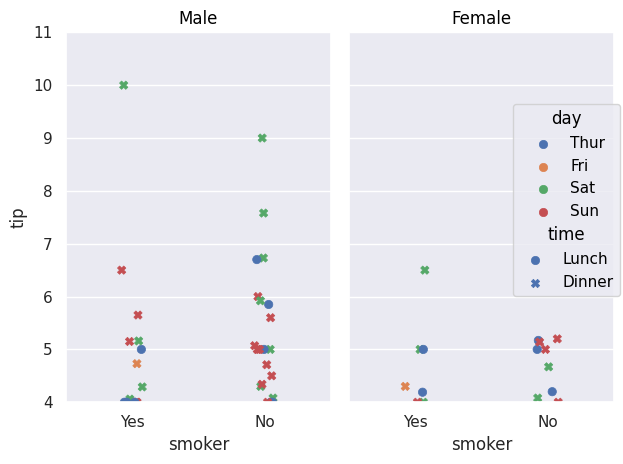
so.Plot(tips,x="smoker",y="tip").add(so.Dot(),so.Jitter(),color="day",
marker="time").facet("sex").limit(y=(4,11)).show()
Jitter() allows you to shift points so they do not overlap, as with the jitter parameter in previous methods. color plays the same role as the previous hue parameter, allowing data to be separated according to a variable. marker allows the use of another variable that will be differentiated using different point types. facet() plays the same role as row and col.
We can also easily add a regression curve using Line() and Polyfit():
so.Plot(tips, x="total_bill", y="tip").add(so.Dot(),
color="day", marker="time").facet("sex")
.add(so.Line(), so.PolyFit(), color="time").show()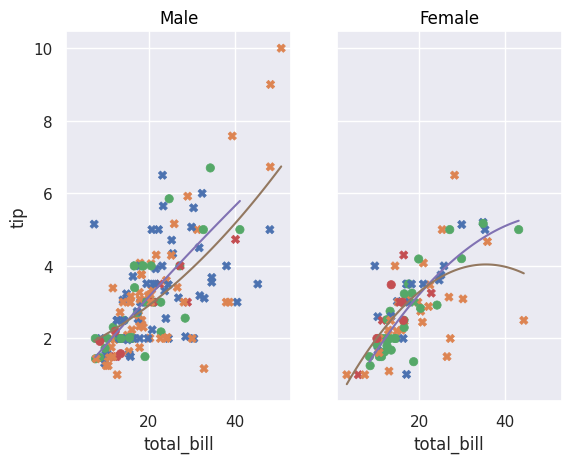
This same Line() can have different types such as Polyfit() but can also be used to represent data:
diamonds=sns.load_dataset("diamonds")
diamonds.query("cut == 'Ideal' and color != 'J' and color!= 'E' and color!='H' and color!='I' and color!='G'")
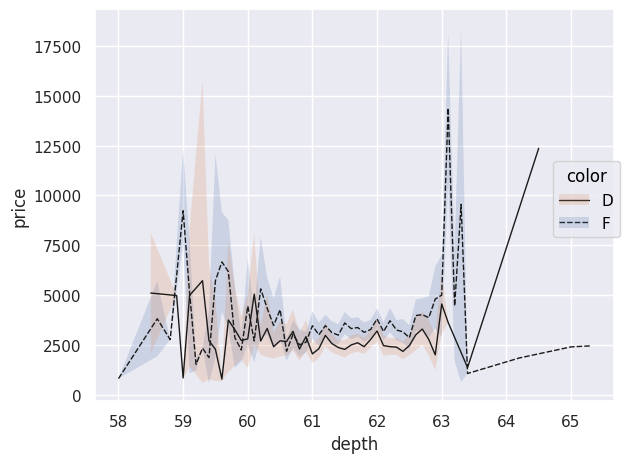
.pipe(so.Plot, "depth", "price",linestyle="color").add(so.Line(color=".1",linewidth=1),so.Agg())
.add(so.Band(), so.Est(),group="color",color="color").show()
If no specific type of Line() is specified, data points are connected with lines. An interesting aspect of using pandas DataFrames, as provided by load_dataset(), is that you can use .query() to make SQL-like queries to select specific data. Here, we only select diamonds whose "cut" is "Ideal" and with certain colors. The chained pipe() function passes this filtered DataFrame as an argument to the Plot() function; other arguments such as x, y, and linestyle can then be provided. The plotted line does not correspond to each observation point; indeed, the use of Agg() performs data aggregation: each price for a given depth is aggregated and averaged in the plot. The objects Band() and Est() allow displaying uncertainty in the curves.
The Path() object is an alternative to Line(), ideal for representing trajectories because it connects data points in the order in which they are provided.
healthexp=sns.load_dataset("healthexp")
p = so.Plot(healthexp, "Spending_USD", "Life_Expectancy", color="Country").add(so.Path()).show()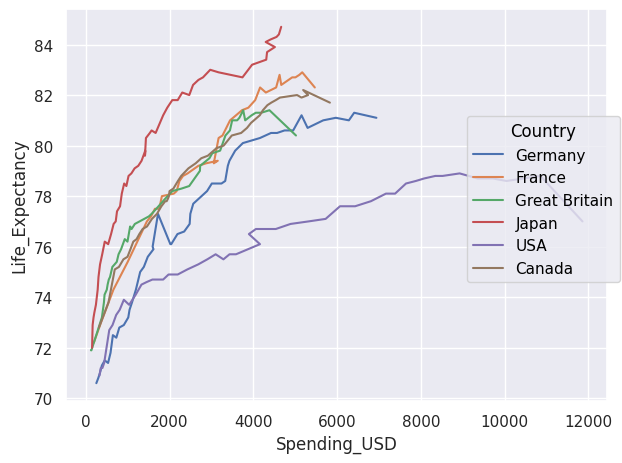
If we want to display the area under curves, we use Area(). The wrap parameter allows you to choose how many plots appear per row.
so.Plot(healthexp,"Year","Spending_USD").facet("Country",wrap=3)
.add(so.Area(),color="Country",legend=False).show()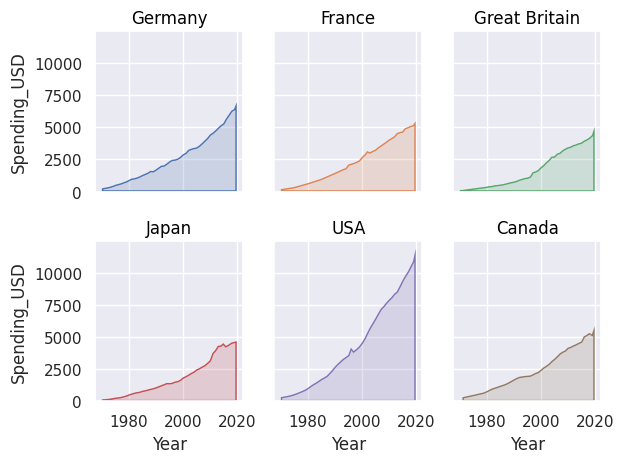
We can stack areas using Stack().
so.Plot(healthexp,"Year","Spending_USD",color="Country")
.add(so.Area(),so.Stack()).show()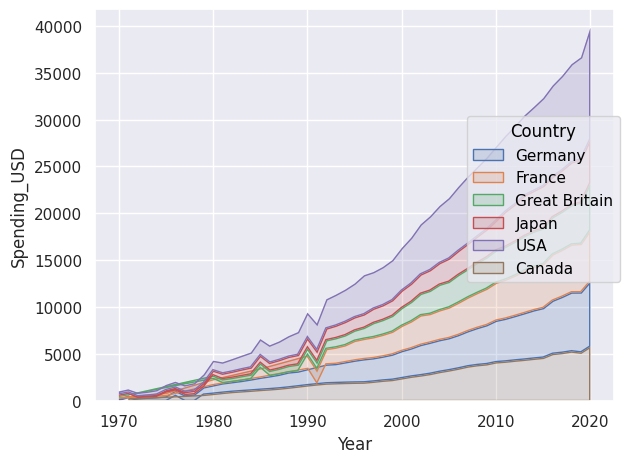
The Range() object allows displaying intervals and requires bounds or an Est() to compute what should be displayed. With the latter, we display the mean and confidence interval. We can also explicitly provide bounds to display.
df = pd.DataFrame({
    "x": [1, 2, 3],
    "y": [10, 15, 20],
    "ymin": [8, 12, 17],
    "ymax": [12, 18, 23]
})

so.Plot(df, x="x", y="y").add(so.Range(), ymin="ymin", ymax="ymax")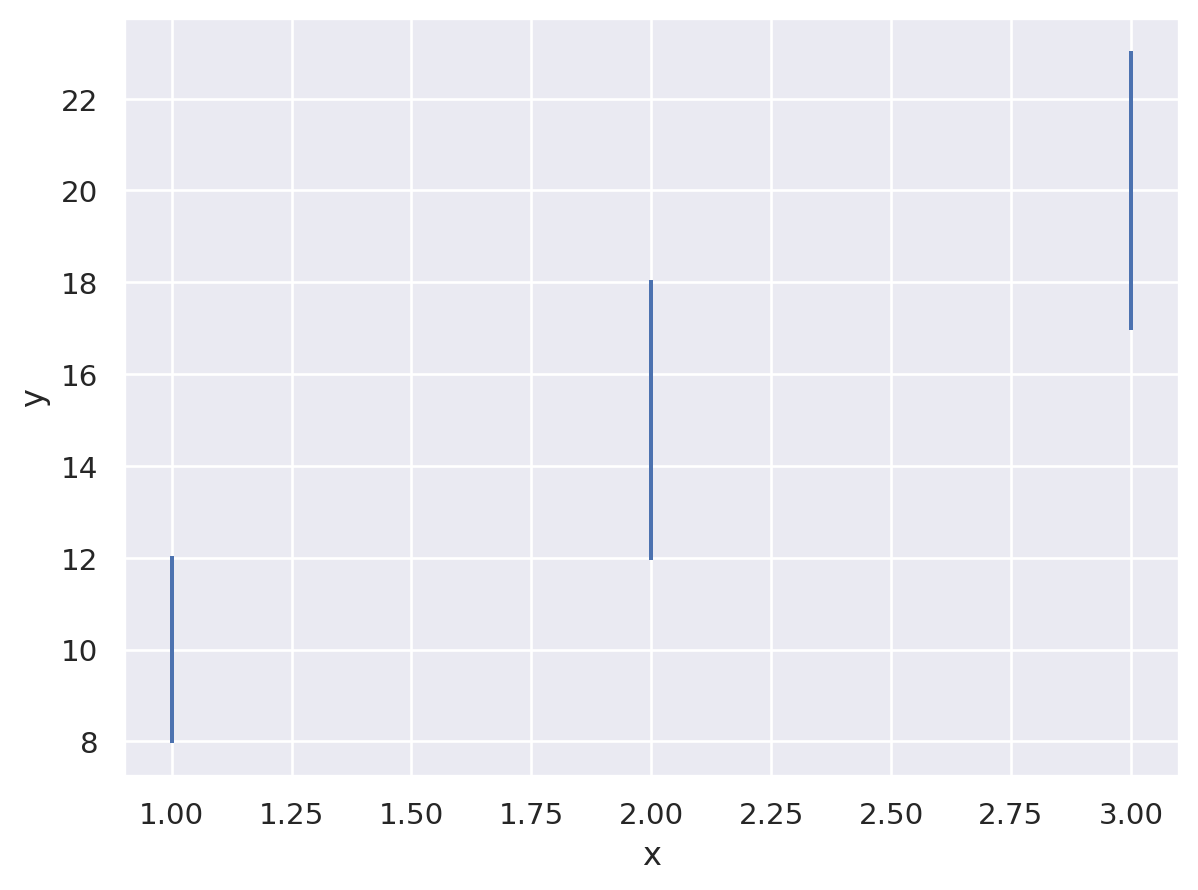
To create histograms, we use Bar() with Hist().
so.Plot(tips,x="total_bill").add(so.Bar(),so.Hist(stat="density"))
.add(so.Line(color="red"),so.KDE()).show()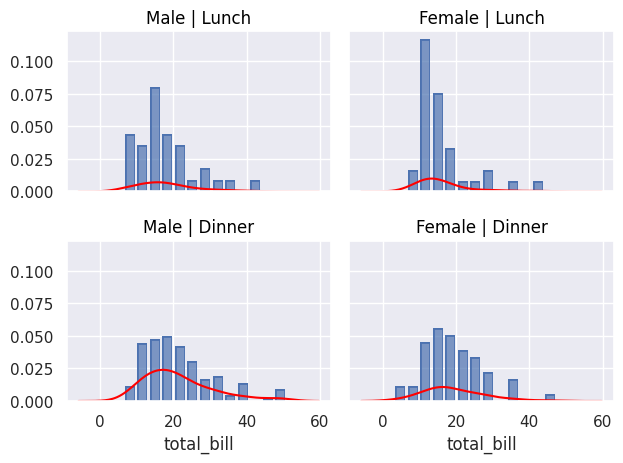
We can also use Bar() to display, for example, an average using Agg(), which performs data aggregation. Dodge() does the same as the dodge parameter in non-object-based plots.
so.Plot(tips, "total_bill", "smoker", color="sex").add(so.Bar(alpha=.5), so.Agg(), so.Dodge()).add(so.Range(), so.Est(errorbar="sd"), so.Dodge()).show()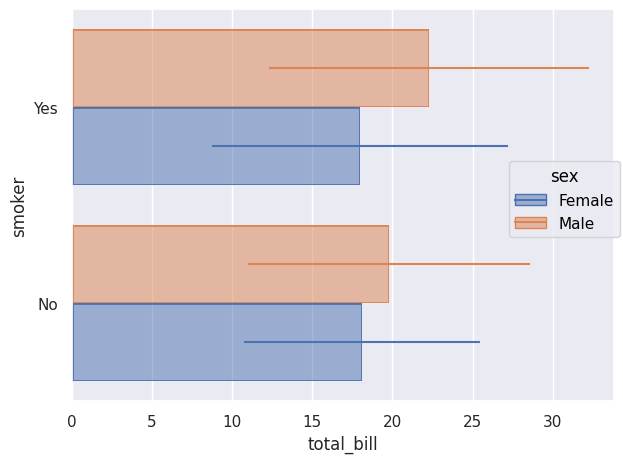
To simply count occurrences, we also use Bar() with Count().
so.Plot(tips,y="day",color="smoker").add(so.Bar(),so.Count(),so.Stack()).show()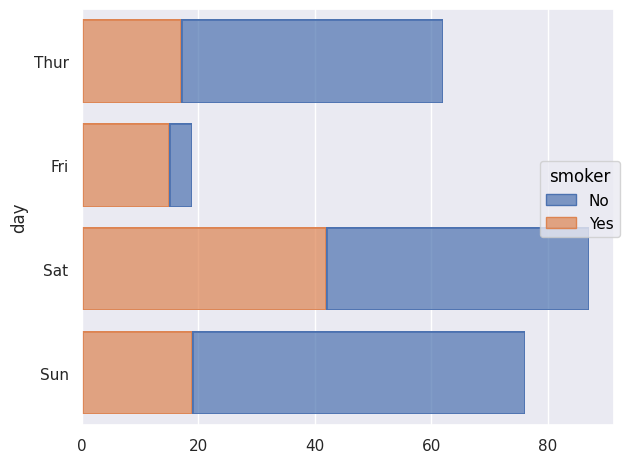
We can also use Seaborn objects to display percentiles using Perc(). We can choose which percentiles to display; here they are shown as Dot(). If nothing specific is chosen, the percentiles [20,40,60,80,100] are displayed.
so.Plot(tips,"smoker","total_bill").add(so.Dot(marker="s"),so.Perc([10,50,90])).show()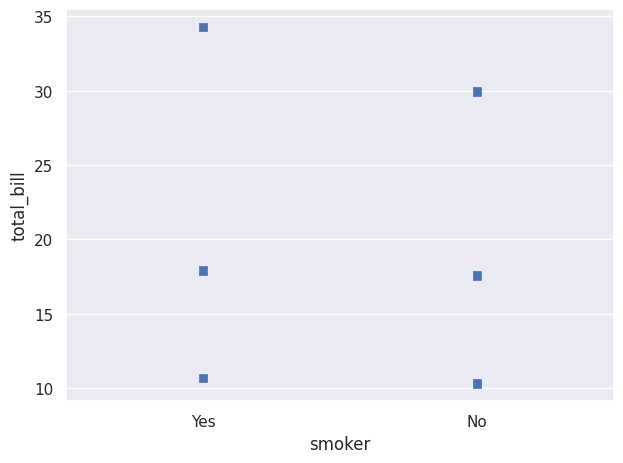
We can create a plot where different percentile intervals are added using Range(), shifted with Shift() so they are visible. Here, scale() is used to change the axis scale, here the x-axis.
so.Plot(diamonds, "price", "cut").add(so.Dots(pointsize=1, alpha=.2), so.Jitter(.3)).add(so.Range(color="k"), so.Perc([0, 25]), so.Shift(y=.2)).add(so.Range(color="k"), so.Perc([75, 100]), so.Shift(y=.2)).scale(x="log").show()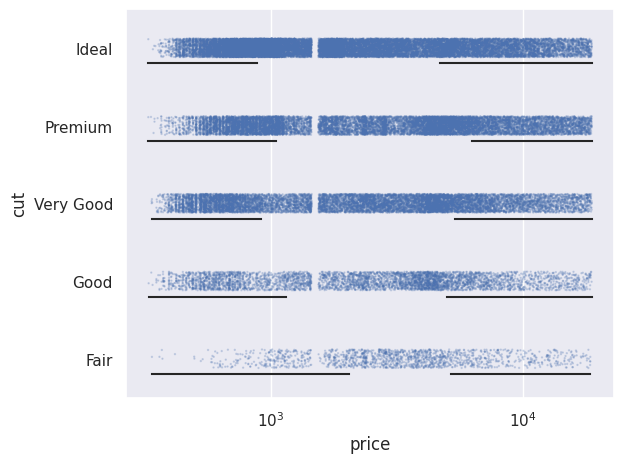
We can also normalize values using Norm(). Here we normalize relative to the minimum year, i.e. 1970.
so.Plot(healthexp, x="Year", y="Spending_USD", color="Country")
.add(so.Lines(), so.Norm(where="x == x.min()",percent=True))
.show()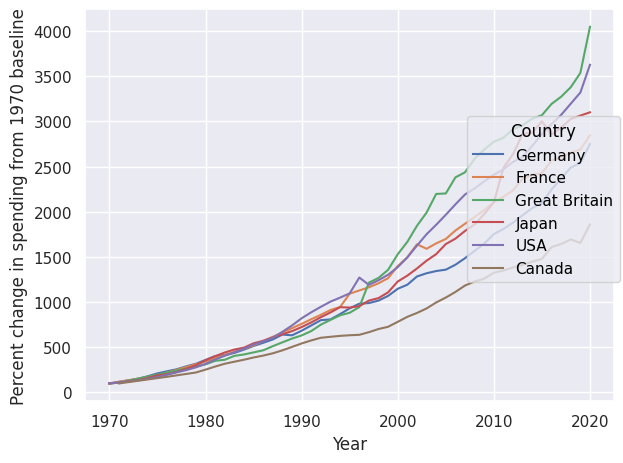
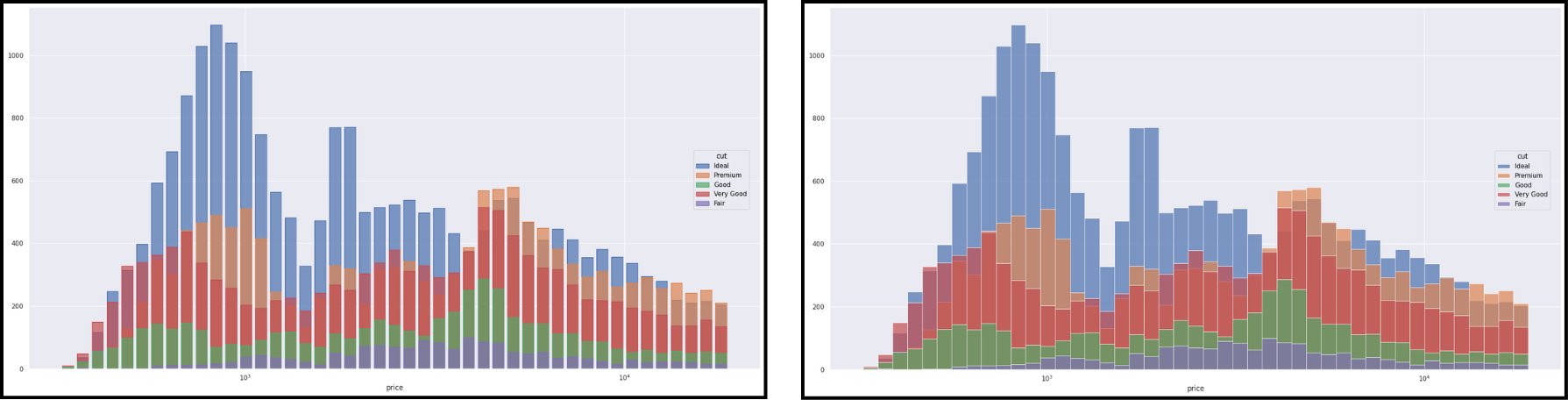
The objects Dot(), Line(), Path() and Bar() have variants (Dots, Lines, etc.) better suited for large datasets. Here is an example with Bar() on the left and Bars() on the right.
We can also modify axis scales using scale().
so.Plot(tips,x="total_bill",y="tip")
.add(so.Dots(),so.Jitter(0.5),color="day",marker="time")
.scale(x=so.Continuous(trans="log"),y=so.Continuous(trans="sqrt"))
.show()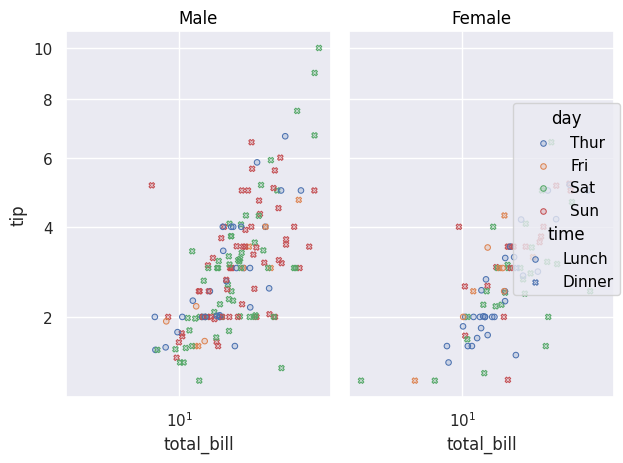
-
-
-
-
-
There are different visual options available in Seaborn, whether in terms of point style, line style, or colors.
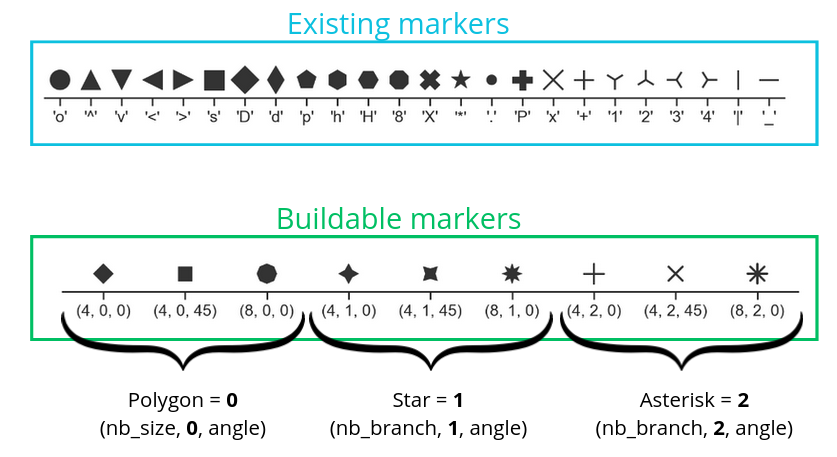
Here is an example of code:
so.Plot(tips, x="total_bill", y="tip")
.add(so.Dots(marker="x"), so.Jitter(0.5))
.show()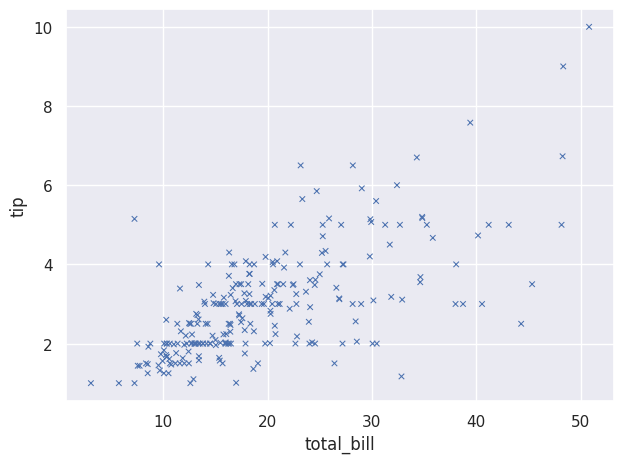
We can also change the type of lines we use:
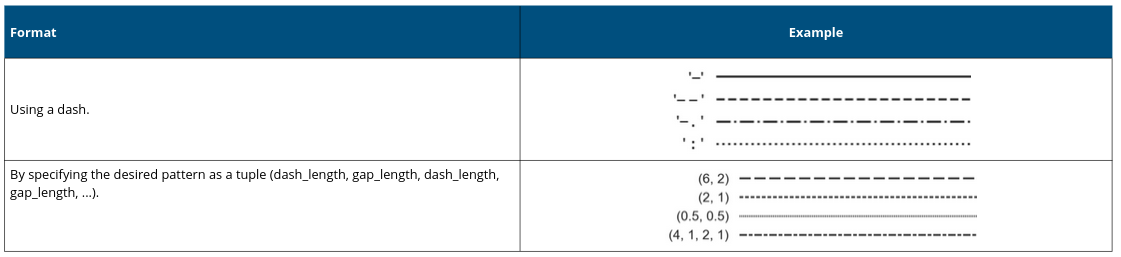
Here is an example:
so.Plot(tips,"total_bill","tip").add(so.Lines(linestyle='--'))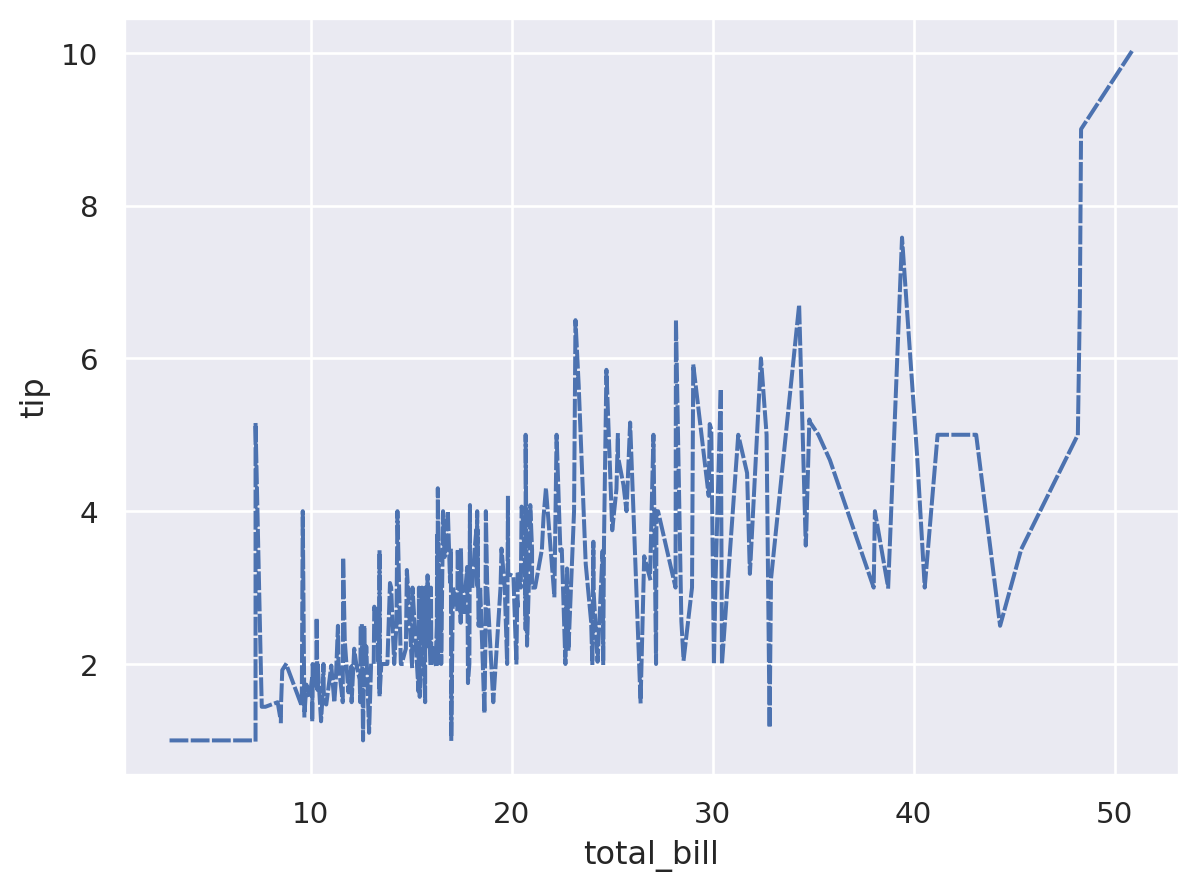
We can also choose specific colors:
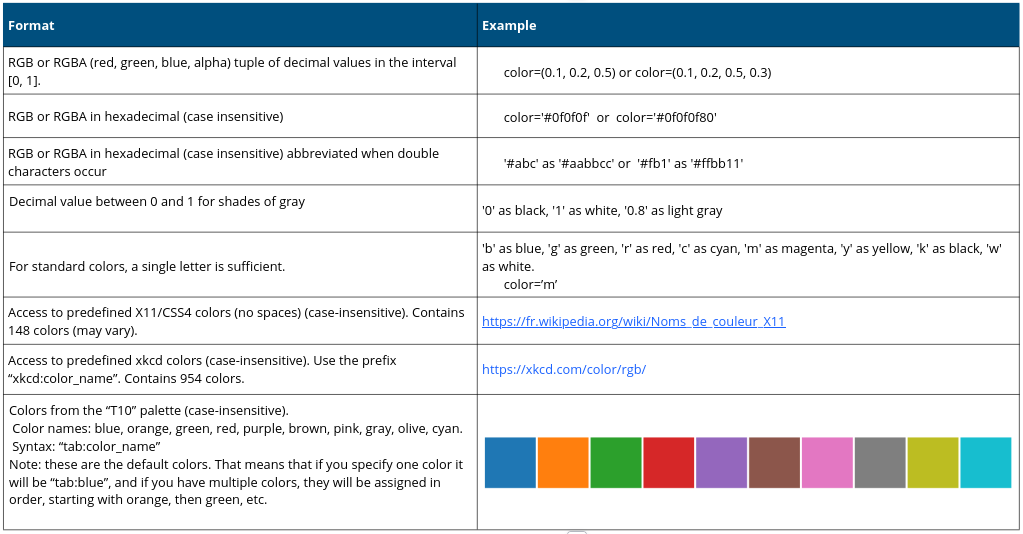
Here is an example:
so.Plot(tips, "total_bill", "tip",
        color="sex", linestyle="sex")
.add(so.Lines())
.scale(color={"Male": "blue","Female": "red"},
       linestyle={"Male": "--","Female": (4,4)})
.show()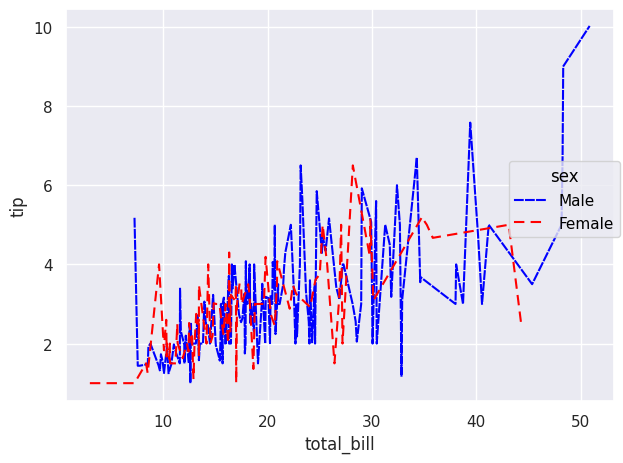
We can also define colors using color palettes:
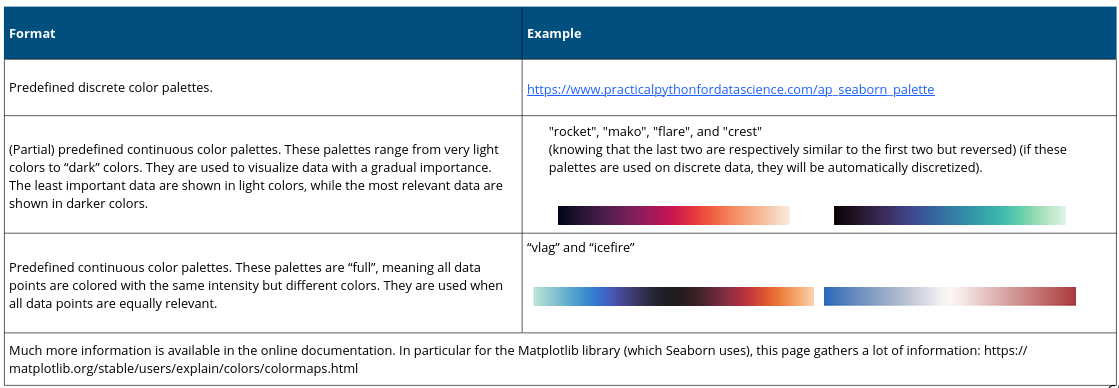
And here is an example based on a previous code:
so.Plot(healthexp, x="Year", y="Spending_USD", color="Country")
.add(so.Lines(), so.Norm(where="x == x.min()", percent=True))
.scale(color="rocket")
.label(y="Percent change in spending from 1970 baseline")
.show()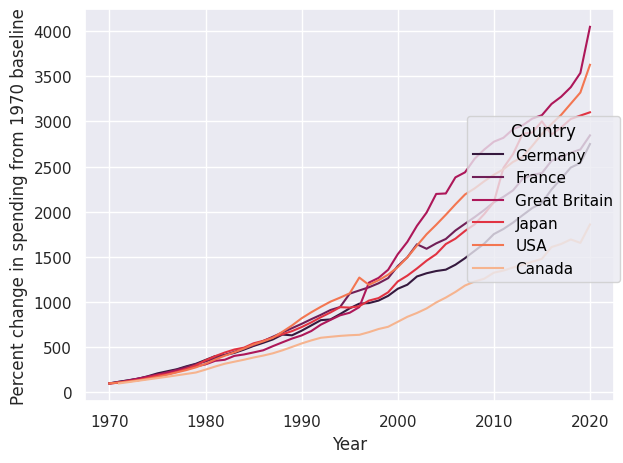
-