Section outline
-
-
Several free annotation tools exist, such as CVAT, Label Studio, or Roboflow; the latter will be prioritized and detailed here. The procedure begins with creating an account on the Roboflow platform, followed by initializing a new object detection project via the standard tool. After importing the images, annotation is performed using the "Bounding Box Tool," accessible from the sidebar.
Each object must be precisely delimited and associated with its respective class. This iterative process continues until the dataset is exhaustively annotated. Once this step is validated, it is necessary to generate a "version" of the annotations to export them in a format compatible with the YOLO architecture.
This versioning phase integrates two types of data processing: preprocessing and data augmentation. Let us examine the specifics and purpose of these two operations.
We must now address some explanatory concepts before proceeding. There are two types of data modification: preprocessing and augmentation. We will briefly overview the utility and nuances of each stage.
PREPROCESSING
Preprocessing consists of applying uniform transformations to the entire annotated dataset. Let x represent the initial number of images; this operation preserves the cardinality of the set (x images before and after) but substitutes the original files with their transformed versions, resulting in the irreversible loss of raw data. The primary objective is the homogenization of the dataset.
Common transformations include:
- Resizing : Ensures uniform dimensions across the entire dataset.
- Grayscale conversion : Eliminates chromatic information when it is irrelevant, thereby optimizing storage space and the required computational power. This operation is exclusive: original color images are definitively replaced.
- Artifact removal : Applies digital filters to eliminate noise or other undesirable visual perturbations.
AUGMENTATION
Although data diversity is crucial, collecting images under varied conditions often proves complex. Data augmentation addresses this constraint by artificially generating new images from existing samples through the application of digital transformations. This technique enables the enrichment and diversification of the training dataset. By submitting variants of the same image to the model (e.g., in grayscale or inverted), one improves its robustness and generalization capacity, allowing it to recognize objects regardless of their orientation or chromatic properties.
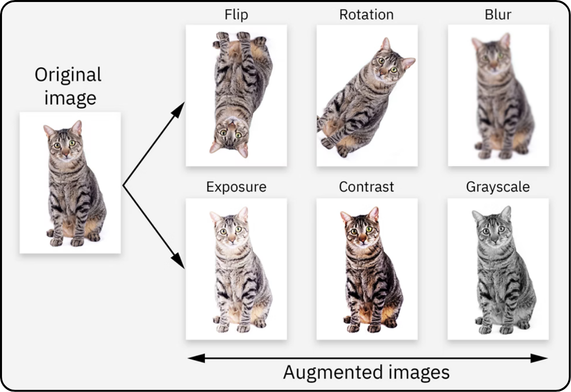
Data augmentation differs from preprocessing in its multiplicative effect on the dataset volume. If x represents the number of initial images and six transformations are applied, the final set will comprise 7x images (x originals plus 6x generated).
Unlike preprocessing, which substitutes raw data, augmentation complements it by retaining the originals. For instance, adding a grayscale conversion during this phase doubles the dataset: the model is thus trained simultaneously on color versions and grayscale versions, maximizing example diversity without loss of initial information.
HOW TO CHOOSE THE ANNOTATION SUPPORT ?
Preprocessing and augmentation can be performed either upstream (via Roboflow) or dynamically (via YOLOv8). The former method, while storage-intensive, accelerates training through the prior generation of data. The latter, space-efficient, increases the computational load by creating variations on the fly.
The strategic choice depends on hardware resources: prioritize dynamic generation (YOLOv8) on powerful infrastructures, and the upstream approach (Roboflow) on limited machines, thereby disabling YOLOv8's default augmentations to avoid distortions.
Once the preprocessing and augmentation transformations have been applied, define the desired number of images in the "5 - Create" section, then validate the version generation.
Next, download this version by selecting the "YOLOv8" format and the `.zip` archive. Finally, extract the contents of this archive directly into your working directory.
-